
Call forwarding redirects an incoming call from the number someone dialled to another destination. Depending on your phone service, that destination can be another phone number, a SIP account, an extension or voicemail. You decide whether calls move immediately or only when a condition is met.
For example, a customer calls your office number. During working hours, your team answers through a SIP phone. If nobody answers, a forwarding rule can try a mobile phone instead. The customer keeps using the same public number; the destination changes according to your rules.
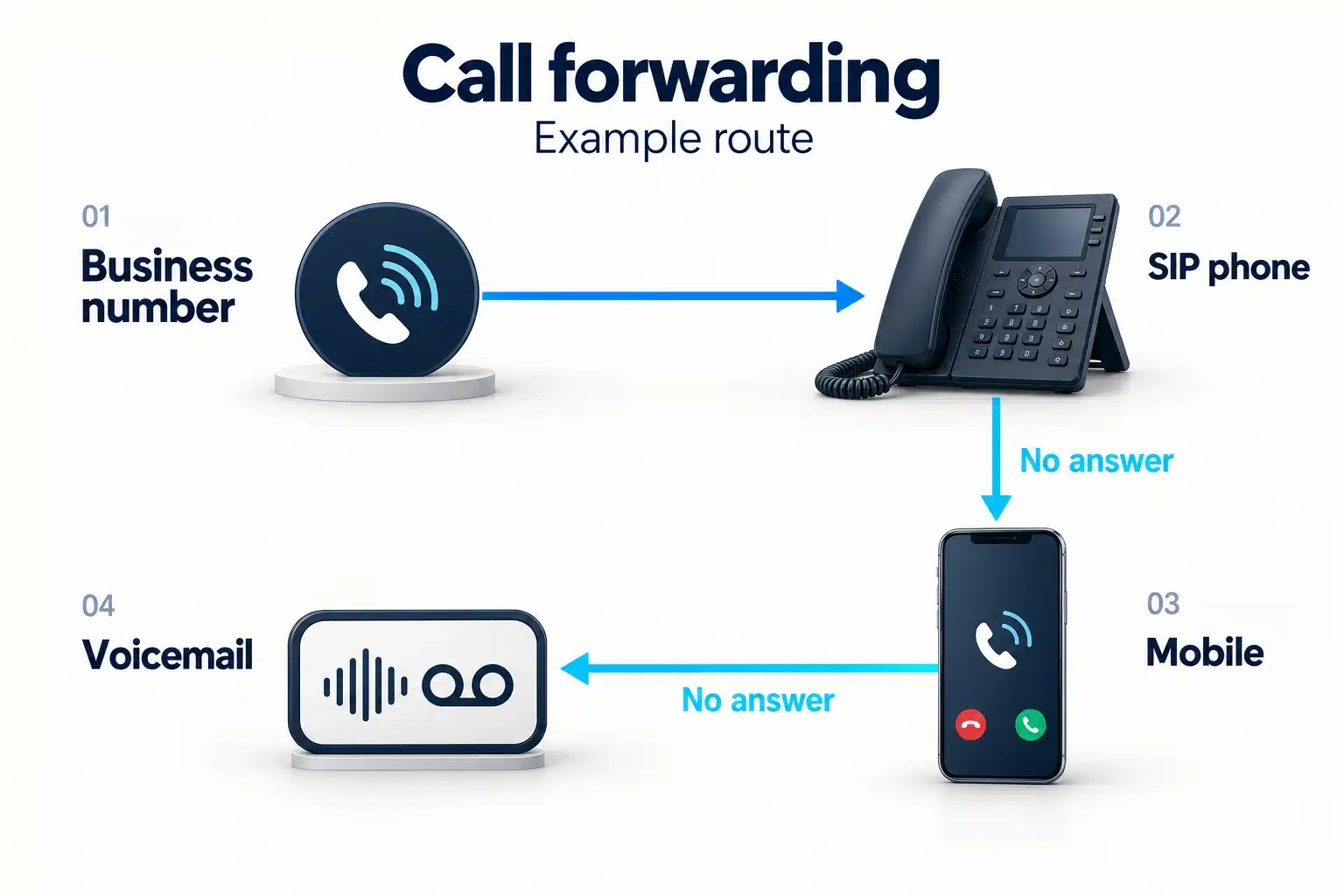
The four common types of call forwarding
These names describe when a call moves. Availability and configuration depend on your carrier or phone platform.
- Always forward, also called unconditional forwarding: every incoming call goes straight to the destination. The original phone does not ring. This suits an office closure or a number used as a permanent entry point for a team.
- Forward when busy: a call moves if the original line cannot take another call. Check how your service handles call waiting and multiple simultaneous calls, because those settings affect when a line is considered busy.
- Forward when unanswered: the original destination rings first. If nobody answers within the configured timeout, the call moves to the next destination.
- Forward when unreachable: a call moves when the original destination cannot be reached. On a mobile network this may mean a switched-off phone or no coverage; on a SIP service it can mean an unavailable endpoint, depending on the platform.
Forwarding a mobile number versus routing a virtual number
With a mobile number, the carrier controls forwarding. The phone’s settings or a carrier-specific dial code tell the network where to send calls. Supported destinations, conditions and charges vary by provider.
A virtual business number gives you a public number that can deliver calls to your configured destinations. An associated phone platform can add schedules, extensions or a sequence of destinations. A Cloud PBX can support a broader routing plan; a simple forwarding rule does not itself create a queue, an IVR menu or a recording service. To answer through an app on your smartphone, read our mobile VoIP guide for iPhone and Android; this is a different destination from an ordinary mobile phone number.
Forwarding also differs from transferring a call. Forwarding follows a rule for an incoming call. A transfer hands an already answered call to another person or destination.
How to set up and test call forwarding
- Identify which service controls the number: your mobile carrier, a fixed-line provider or a virtual-number platform.
- Check that it supports your destination and the condition you want to use. Enter regular phone numbers in the format required by that provider, including the country code where required.
- Choose a rule: always, busy, unanswered or unreachable. For an unanswered rule, set the ringing timeout and decide what happens if the next destination also does not answer.
- Save the setting using your provider’s instructions. Dial codes are not universal: for example, Verizon documents different activation codes from those used by some other networks. For an example of provider-specific instructions, see Verizon’s documented procedure. Follow the instructions for your own carrier rather than copying a code from an unrelated network.
- Test from another phone. Test a normal answer, no answer and an unavailable destination. Check voicemail, caller ID and the charges shown for the forwarded call.
Avoid a forwarding loop: if number A forwards to number B, number B should not send the same call back to A. Give the route a clear final destination, such as a staffed line or voicemail where supported.
What does call forwarding cost?
There is no universal price. A plan may include forwarding, charge for a forwarded call, or combine number rental with usage charges. Check whether the bill includes an incoming call, an outgoing leg to the destination, or both.
Forwarding to a SIP endpoint and forwarding to a regular mobile or landline are different routes; do not assume they have the same rate. International destinations may have different prices or may not be supported by your carrier at all.
For a KataTelecom business setup, review number prices separately from outgoing call rates, and confirm the rate and availability for your proposed forwarding destination. A number’s monthly rental alone is not a quote for every call route.
What does a call forwarded message mean?
A forwarding message generally means that the phone service applied a forwarding rule. The wording and behaviour vary by carrier and device. The message alone does not tell you why the rule was activated, who will answer, or whether a person has blocked your number.
Common questions
Does call forwarding also forward text messages?
Voice call forwarding does not automatically forward SMS. Messaging support and any SMS forwarding are separate features to check with your provider.
Can I forward calls to another country?
Only if your service permits that destination. Check eligibility and pricing first. For example, Verizon’s mobile forwarding documentation restricts the destination to a US number; international forwarding is not a feature to assume across all carriers.
Will the caller see the original number or the forwarding number?
Caller ID presentation depends on the networks and routing settings involved. Test the actual route if recognising customer numbers is important to your team.
How do I turn forwarding off?
Disable the rule through the service that controls it, then make a test call. Check all active conditions: turning off an always-forward rule may leave a separate busy or unanswered rule in place.
Build a business route around one public number
Start with a local virtual number for the market you serve, then confirm the supported destinations and forwarding rates. Map working hours, the first answering destination and the fallback before enabling the route. Your customers can then keep one contact number while your team changes where calls are answered.